
Download Robot Rejection – AI‑Powered Job Hunting Simulation Tool
Overview
Robot Rejection is a fresh, AI‑driven web application that turns the often‑stressful job‑search process into an engaging, satirical experience. Powered by OpenAI’s GPT‑4, the tool lets users upload a resume, define an “ideal” job scenario, and then sit back while the system generates witty, sometimes brutally honest AI responses that mimic real recruiter feedback. The core idea is to give job seekers a lighter‑hearted glimpse into how algorithms and human biases intersect in modern hiring, all while preserving privacy.
No personal data is stored permanently; only the abstracted job posting details and the AI’s generated replies are retained for research and continuous improvement. Whether you’re a seasoned professional looking for a morale boost, a recent graduate curious about AI‑based recruitment, or simply someone who enjoys a good laugh about “robotic” rejections, this tool offers a unique blend of humor, insight, and education. By simulating the whole recruitment pipeline—from resume upload to interview invitation or polite decline—the platform helps users recognize common pitfalls in their applications, understand the language recruiters love, and see how AI can both help and hinder the hiring process.
The experience ranges from genuinely funny to surprisingly reflective, prompting users to share feedback that directly influences future updates. In short, Robot Rejection is more than a joke; it’s a learning sandbox that demystifies AI in hiring while delivering a secure, free, and entertaining environment.
Features & How to Get Started
- GPT‑4 powered response engine with a satirical twist.
- Secure resume upload – data is encrypted in transit and never stored long‑term.
- Customizable job scenario builder (industry, seniority, location, remote options).
- Real‑time AI feedback that mimics recruiter language, including “We regret to inform…”.
- Insightful analytics dashboard showing common rejection themes.
- Feedback loop – users can rate AI replies to help improve future versions.
- Anonymous usage mode – no personal identifiers required.
- Cross‑platform web access – works on any modern browser.
- Regular updates driven by community suggestions.
- Free tier with optional premium add‑ons for deeper analytics.
Installation & First‑Time Use
Because Robot Rejection is a web‑based application, there is no traditional “install” process. Users simply navigate to the official site using a supported browser (Chrome, Firefox, Edge, or Safari). The first step is to create a lightweight account—just an email address or a disposable alias—to keep track of your sessions.
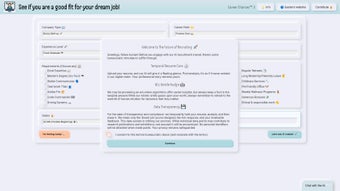
After logging in, you’ll see a clean dashboard with an “Upload Resume” button. Supported file formats include PDF, DOCX, and plain text. Once your resume is uploaded, the “Job Scenario Builder” guides you through selecting industry, role level, preferred location, and any remote‑work preferences.
After confirming the scenario, hit “Submit” and let the AI generate its response. The reply appears within seconds, complete with a mock email header, interview invitation, or polite decline—each crafted to reflect realistic recruiter tone while injecting humor. You can then rate the response, add comments, or generate a new scenario for comparison.
The platform also offers a “History” tab where past interactions are stored for the current session, allowing you to review patterns without compromising privacy. For users seeking deeper insight, the “Analytics” section visualizes the most common rejection reasons (e.g., “skill gap,” “cultural fit”) across all your simulated applications, giving you a clear roadmap for real‑world improvement.
Compatibility, Pros & Cons
Robot Rejection runs entirely in the cloud, so it is compatible with any operating system that supports a modern web browser. This includes Windows 10/11, macOS Ventura and later, Linux distributions (Ubuntu, Fedora, etc.), Chrome OS, as well as mobile platforms such as Android 8.0+ and iOS 13+. Because the service is accessed via HTTPS, users benefit from end‑to‑end encryption regardless of device. No additional plugins or extensions are required, making the tool truly cross‑platform and ideal for students, remote workers, and recruiters who switch between devices throughout the day.
Pros
- Free to use for basic simulations, lowering the barrier for job seekers.
- AI-generated feedback is both entertaining and educational.
- Strong focus on privacy – no permanent storage of personal data.
- Instant response time thanks to cloud‑based GPT‑4 processing.
- Customizable scenarios let users explore many career paths quickly.
- Analytics help identify recurring weaknesses in resumes or cover letters.
- Accessible from any device with a browser, no installation hassles.
Cons
- Humorous tone may not suit users looking for strictly serious feedback.
- Limited to English language responses in the current version.
- Premium analytics require a paid upgrade, which may be a barrier for some.
- Since the AI mimics recruiters, some responses can feel overly harsh.
- Dependent on internet connectivity; offline use is not possible.
Frequently Asked Questions
Is my resume data stored permanently?
No. Robot Rejection encrypts your resume during upload and discards it after generating the AI response. Only anonymized job posting data and the AI’s reply are retained for research purposes.
Can I use the tool on my mobile phone?
Absolutely. The web application is fully responsive and works on Android and iOS browsers. You get the same features as on a desktop.
Do I need an OpenAI account to use Robot Rejection?
No. Robot Rejection handles all GPT‑4 interactions on its own servers, so you only need a simple email alias for account creation.
What languages are supported for the AI responses?
Currently only English is supported, but the development roadmap includes plans for Spanish, French, and German in upcoming releases.
How can I provide feedback to improve the tool?
Each AI response includes a rating widget. You can also submit detailed comments through the “Feedback” button in the dashboard, which are reviewed by the development team for future updates.
Conclusion & Call to Action
Robot Rejection offers a rare combination of humor, insight, and privacy‑first design that makes it stand out among career‑development tools. By leveraging GPT‑4’s language capabilities, it turns the dreaded “rejection email” into a teachable moment, helping users spot weaknesses and adjust their approach before they ever hit “Send” on a real application. The web‑based nature ensures that anyone with an internet connection can download and start using the tool instantly, without worrying about OS compatibility or costly installations. While the satire may not be for everyone, the underlying analytics and feedback mechanisms provide genuine value for job seekers at any stage of their career. If you’re ready to explore the lighter side of recruitment while gaining actionable insights, click the button below to start your free simulation today.
Start Your Free Simulation Now
Pros: Free basic tier, witty AI feedback, strong privacy, cross‑platform.
Cons: Satirical tone may not suit all, English‑only, premium analytics cost.



.png)



